1
2
|
npm install react-markdown react-syntax-highlighter
|
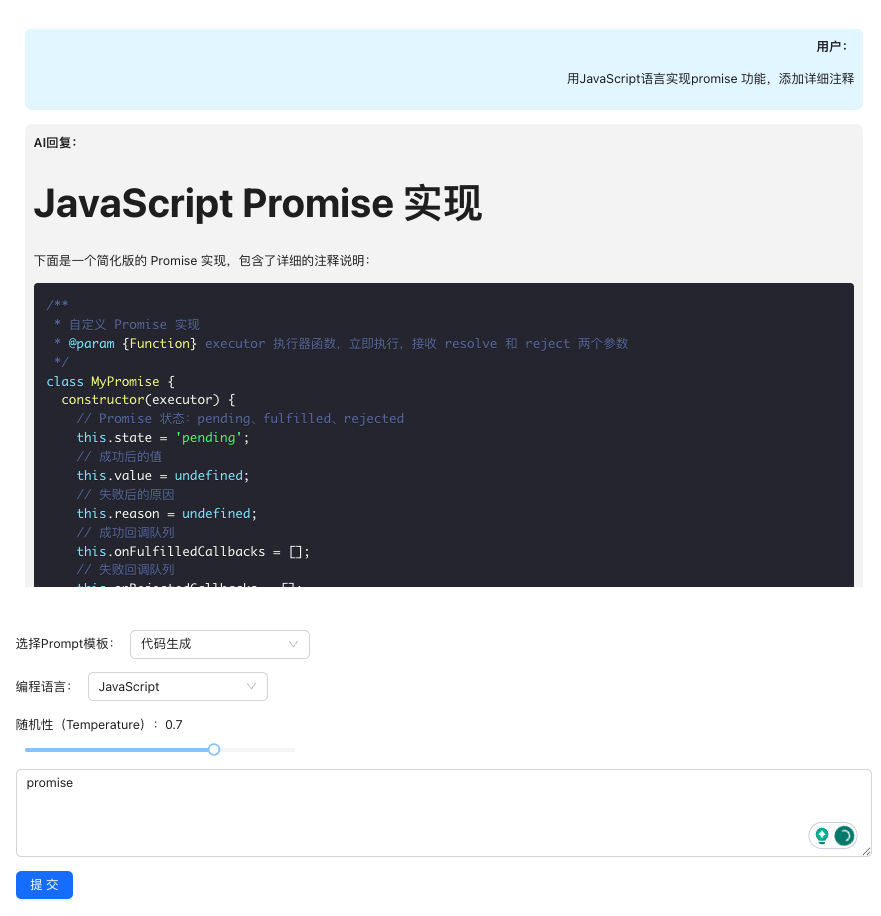
文心一言返回的结果可能是文本、Markdown、代码等,需针对性做可视化渲染,提升阅读体验。
使用 react-markdown 渲染 Markdown 格式结果,区分用户 / AI 消息样式:
1
2
3
4
5
6
7
8
9
10
11
12
13
14
15
16
17
18
19
20
21
22
23
24
25
26
27
28
29
30
31
32
33
34
35
36
37
38
39
40
41
42
43
44
45
46
47
48
49
50
51
52
53
54
55
56
57
58
59
60
61
62
63
64
65
66
67
68
69
70
71
72
73
74
75
76
77
78
79
80
81
82
83
84
85
86
87
| import ReactMarkdown from 'react-markdown';
import { Card, Typography } from 'antd';
import { Prism as SyntaxHighlighter } from 'react-syntax-highlighter';
import { dracula } from 'react-syntax-highlighter/dist/esm/styles/prism';
const { Text } = Typography;
const ResultVisualization = ({
chatContext,
}: {
chatContext: Array<{ role: string; content: string }>;
}) => {
if (chatContext.length === 0)
return <div style={{ marginTop: '20px' }}>暂无对话结果</div>;
return (
<Card variant={'borderless'} style={{ marginTop: '20px' }}>
<div style={{ maxHeight: '600px', overflowY: 'auto', padding: '10px' }}>
{chatContext.map((msg, index) => (
<div
key={index}
style={{
marginBottom: '15px',
padding: '10px',
borderRadius: '8px',
backgroundColor: msg.role === 'user' ? '#e6f7ff' : '#f5f5f5',
textAlign: msg.role === 'user' ? 'right' : 'left',
}}
>
<Text strong>{msg.role === 'user' ? '用户:' : 'AI回复:'}</Text>
{/* 渲染Markdown格式结果 */}
<ReactMarkdown
components={{
code({ node, inline, className, children, ...props }) {
const match = /language-(\w+)/.exec(className || '');
return !inline && match ? (
<div className="my-2 rounded-lg overflow-hidden">
<SyntaxHighlighter
language={match[1]}
style={dracula}
PreTag="div"
{...props}
>
{String(children).replace(/\n$/, '')}
</SyntaxHighlighter>
</div>
) : (
<code
className={`px-1 py-0.5 rounded bg-gray-200 text-primary font-mono text-sm ${className}`}
{...props}
>
{children}
</code>
);
},
p: ({ children }) => (
<p className="my-2 leading-relaxed">{children}</p>
),
ul: ({ children }) => (
<ul className="list-disc pl-5 my-2">{children}</ul>
),
ol: ({ children }) => (
<ol className="list-decimal pl-5 my-2">{children}</ol>
),
h1: ({ children }) => (
<h1 className="text-2xl font-bold my-4">{children}</h1>
),
h2: ({ children }) => (
<h2 className="text-xl font-bold my-3">{children}</h2>
),
h3: ({ children }) => (
<h3 className="text-lg font-bold my-2">{children}</h3>
),
}}
>
{msg.content}
</ReactMarkdown>
</div>
))}
</div>
</Card>
);
};
export default ResultVisualization;
|
代码仓库地址:https://github.com/wmshero/bce-ai-project