本文介绍了简单的通过Node.js调用文新一言API,也介绍了如何通过vite+react前端调用,使用Node.js自建后端接口做代理中专,前端请求自己的后端,后端再请求文心一言 API(服务端之间无跨域限制)。

这只是简单的介绍,实际使用需要做到性能、体验优化、以及安全防护等。

  • 性能、体验优化:输入防抖、增加限流与降级(添加客户端限流,避免请求超限)
  • 安全:XSS 防护(使用DOMPurify过滤 AI 返回的 HTML 内容,防止跨站脚本攻击)
  • API Key 保护:严禁将 API Key 硬编码到前端代码,始终通过环境变量管理;生产环境建议通过后端中转请求,进一步降低密钥泄露风险。可配合后端密钥管理工具(如阿里云 KMS、腾讯云密钥管理)进一步保护。
  • 内容合规:在前端添加用户输入过滤,同时校验 AI 返回内容,确保符合平台规范。
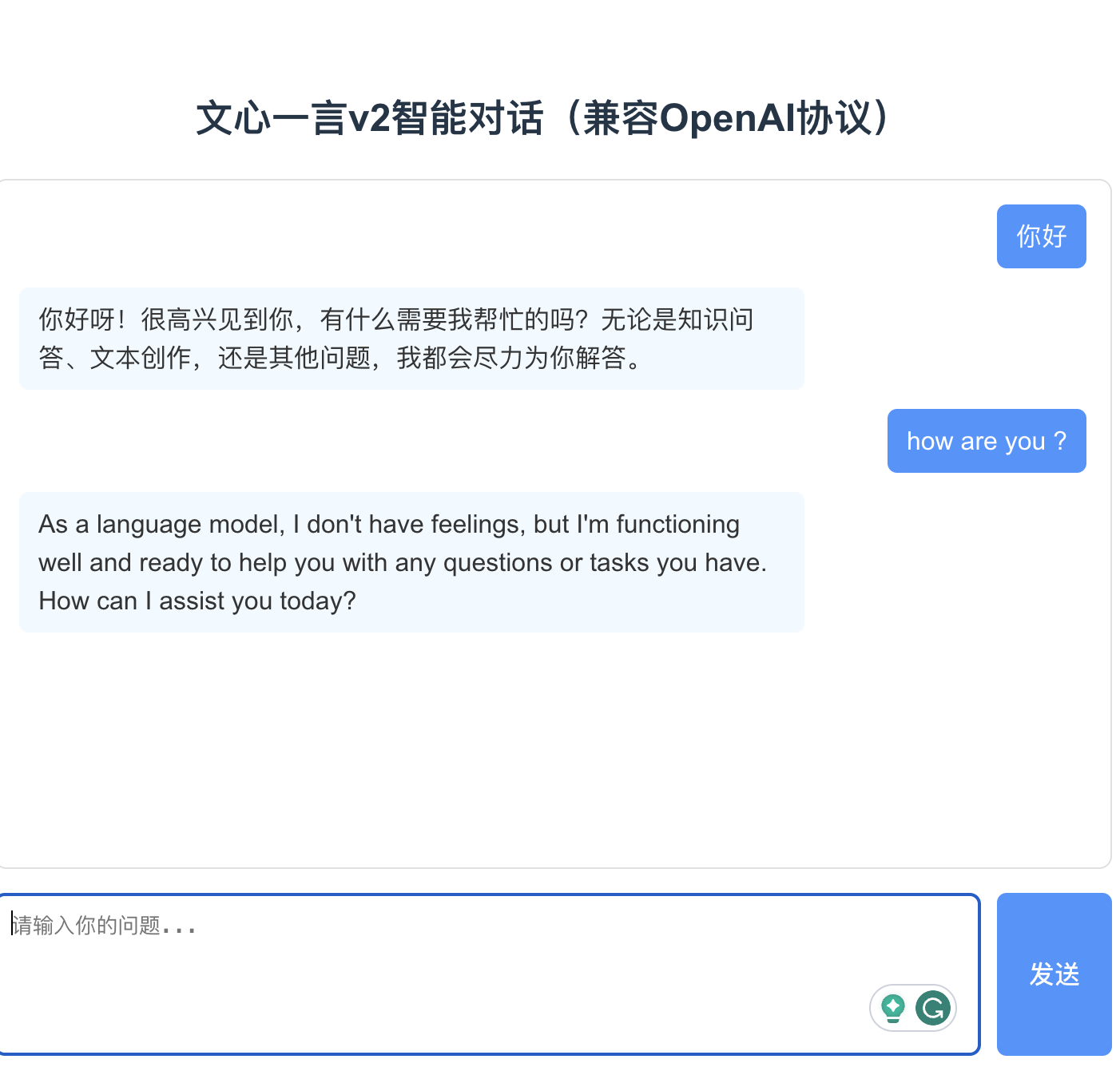
文心一言对话界面

简单Node.js调用

  1. 进入【百度智能云】登录或者注册账号 https://cloud.baidu.com/?from=console
  2. npm init -y
  3. 请安装 OpenAI SDK : npm install openai
1
2
3
4
5
6
7
8
9
10
11
12
13
14
15
16
17
18
19
20
21
22
23
24
25
26
27
28
29
30
31
32

import OpenAI from "openai";
const openai = new OpenAI({
baseURL: 'https://qianfan.baidubce.com/v2',
apiKey: '密钥', //bce开头的
defaultHeaders: {"appid":"undefined"} //app开头的
});

async function main() {
const response = await openai.chat.completions.create({
"model": "ernie-5.0-thinking-preview",
"messages": [
{
role: 'system',
content: 'You are a helpful assistant.',
},
{
role: 'user',
content: '你好',
},
],
"fps": 2,
"web_search": {
"enable": true
}
});

console.log(response);
}

main();

结果

1
2
3
4
5
6
7
8
9
10
11
12
13
14
15
16
17
18
19
20
{
id: 'as-376st90fy8',
object: 'chat.completion',
created: 1765681797,
model: 'ernie-5.0-thinking-preview',
choices: [ { index: 0, message:
[
{
role: 'assistant',
content: '你好!有什么我可以帮助你的吗?无论是聊天、解答问题还是需要建议,都可以告诉我哦~',
reasoning_content: '用户发来“你好”,我需要回应。首先,用户可能只是打个招呼,所以应该友好回应。可以说“你好!有什么我可以帮助你的吗?”这样既礼貌又主动提供帮助。需要保持自然,符合日常交流的感觉。'
}
], finish_reason: 'stop', flag: 0 } ],
usage: {
prompt_tokens: 7,
completion_tokens: 66,
total_tokens: 73,
completion_tokens_details: { reasoning_tokens: 46 }
}
}

具体的API参考https://cloud.baidu.com/doc/qianfan-api/s/3m9b5lqft

Vite+React+Node.js调用

文心一言的公开 API 默认不支持前端直连(仅允许服务端调用),解决该问题的核心方案是:通过自建后端接口做「代理中转」,前端请求自己的后端,后端再请求文心一言 API(服务端之间无跨域限制)。

步骤 1:搭建 Node.js 后端代理服务

1.1 初始化后端项目

1
2
3
4
mkdir ernie-proxy && cd ernie-proxy
npm init -y

npm install express cors axios dotenv

1.2 创建后端代理配置(.env)

1
2
3
4
# ernie-proxy/.env
ERNIE_API_KEY=你的文心一言v2 API Key
ERNIE_V2_ENDPOINT=https://aip.baidubce.com/rpc/2.0/ai_custom/v1/wenxinworkshop/chat/ernie-v2
PROXY_PORT=3001

1.3 编写后端代理代码(server.js)

1
2
3
4
5
6
7
8
9
10
11
12
13
14
15
16
17
18
19
20
21
22
23
24
25
26
27
28
29
30
31
32
33
34
35
36
37
38
39
40
41
42
43
44
45
46
47
48
49
50
51
52
53
54
55
56
57
58
59
60
61
62
63
64
const express = require('express');
const cors = require('cors');
const axios = require('axios');
require('dotenv').config();

const app = express();
const PORT = process.env.PROXY_PORT || 3001;

// 1. 配置跨域:允许前端源(localhost:5173)访问
app.use(cors({
origin: 'http://localhost:5173', // 精准匹配前端地址,生产环境替换为你的域名
methods: ['POST'], // 仅允许POST请求
allowedHeaders: ['Content-Type']
}));

// 2. 解析JSON请求体
app.use(express.json());

// 3. 定义代理接口:前端请求这个接口,后端中转到文心一言
app.post('/api/ernie-v2/chat', async (req, res) => {
try {
// 校验请求参数
if (!req.body.prompt) {
return res.status(400).json({ error: '缺少prompt参数' });
}

// 构造文心一言v2请求参数(兼容OpenAI协议)
const ernieRequest = {
messages: [{ role: 'user', content: req.body.prompt }],
temperature: 0.7,
max_tokens: 2000
};

// 后端请求文心一言API(服务端无跨域限制)
const response = await axios.post(
process.env.ERNIE_V2_ENDPOINT,
ernieRequest,
{
headers: {
'Content-Type': 'application/json',
'Authorization': `Bearer ${process.env.ERNIE_API_KEY}`
}
}
);

// 将文心一言的响应返回给前端
res.json({
success: true,
data: response.data.result
});
} catch (error) {
console.error('代理请求失败:', error);
res.status(500).json({
success: false,
error: 'AI接口调用失败,请稍后重试',
detail: error.message
});
}
});

// 启动后端服务
app.listen(PORT, () => {
console.log(`代理服务运行在:http://localhost:${PORT}`);
});

步骤 2:前端代码

2.1 前端环境变量(.env)

1
2
# 前端项目/.env
VITE_PROXY_API=/api/ernie-v2/chat

2.2封装接口请求逻辑

在前端项目中创建src/services/ernieService.ts文件,基于 OpenAI 协议格式封装接口调用,实现对话功能:

1
2
3
4
5
6
7
8
9
10
11
12
13
14
15
16
17
18
19
20
21
22
23
24
25
26
27
28
29
30
31
32
33
34
35
36
37
38
39
40
41
42
43
44
45
46
47
48
49
50
51
52
53
54
55
56
57
58
59
import axios from 'axios';

// 定义符合OpenAI协议的请求参数类型
interface ErnieV2Request {
messages: Array<{
role: 'user' | 'assistant' | 'system';
content: string;
}>;
temperature?: number;
max_tokens?: number;
}

// 定义v2接口响应类型
interface ErnieV2Response {
id: string;
object: string;
created: number;
model: string;
choices: Array<{
message: {
role: string;
content: string;
};
finish_reason: string;
index: number;
}>;
usage: {
prompt_tokens: number;
completion_tokens: number;
total_tokens: number;
};
}

/**
* 调用代理接口获取文心一言v2回复
* @param prompt 用户输入
* @returns AI回复内容
*/
export const fetchErnieResponse = async (prompt: string) => {
try {
const response = await axios.post(
import.meta.env.VITE_PROXY_API!,
{ prompt }, // 传给后端的参数
{
headers: {
'Content-Type': 'application/json'
}
}
);

if (!response.data.success) {
throw new Error(response.data.error);
}
return response.data.data;
} catch (error) {
console.error('请求代理接口失败:', error);
throw new Error((error as any).response?.data?.error || '网络异常,请检查后端服务');
}
};

2.3、在页面中集成对话功能

2.3.1 实现对话组件

在 React 项目中创建src/components/ErnieChat.tsx组件,调用封装的接口工具,实现用户输入和 AI 回复的交互逻辑:

1
2
3
4
5
6
7
8
9
10
11
12
13
14
15
16
17
18
19
20
21
22
23
24
25
26
27
28
29
30
31
32
33
34
35
36
37
38
39
40
41
42
43
44
45
46
47
48
49
50
51
52
53
54
55
56
57
58
59
60
61
62
63
64
65
66
67
68
69
70
71
72
73
74
75
76
77
78
79
80
81
82
83
84
85
86
87
88
89
90
91
92
93
94
95
96
97
98
99
100
101
102
103
104
105
106
107
108
109
110
111
112
113
114
115
116
117
118
119
120
121
122
123
124
125
import { useState } from 'react';
import { fetchErnieResponse } from '../services/ernieService';

const ErnieChat = () => {
const [inputValue, setInputValue] = useState('');
const [chatHistory, setChatHistory] = useState<Array<{ role: string; content: string }>>([]);
const [loading, setLoading] = useState(false);

/**
* 处理发送按钮点击事件
*/
const handleSendMessage = async () => {
if (!inputValue.trim() || loading) return;

// 将用户输入加入对话历史
const userMessage = { role: 'user', content: inputValue };
setChatHistory(prev => [...prev, userMessage]);
setInputValue('');
setLoading(true);

try {
// 调用v2接口获取AI回复
const aiReply = await fetchErnieResponse(inputValue);
// 将AI回复加入对话历史
setChatHistory(prev => [...prev, { role: 'assistant', content: aiReply }]);
} catch (err) {
// 错误提示加入对话历史
setChatHistory(prev => [
...prev,
{ role: 'system', content: (err as Error).message }
]);
} finally {
setLoading(false);
}
};

return (
<div style={{ width: '700px', margin: '50px auto', fontFamily: 'Arial' }}>
<h2 style={{ textAlign: 'center' }}>文心一言v2智能对话(兼容OpenAI协议)</h2>

{/* 对话历史展示区 */}
<div
style={{
height: '400px',
border: '1px solid #e0e0e0',
borderRadius: '8px',
padding: '15px',
marginBottom: '15px',
overflowY: 'auto'
}}
>
{chatHistory.length === 0 ? (
<p style={{ color: '#999', textAlign: 'center' }}>请输入问题开始对话</p>
) : (
chatHistory.map((msg, index) => (
<div
key={index}
style={{
marginBottom: '12px',
textAlign: msg.role === 'user' ? 'right' : 'left'
}}
>
<span
style={{
display: 'inline-block',
padding: '8px 12px',
borderRadius: '6px',
maxWidth: '70%',
backgroundColor: msg.role === 'user'
? '#4096ff'
: msg.role === 'system'
? '#f5f5f5'
: '#f0f9ff',
color: msg.role === 'user' ? '#fff' : '#333'
}}
>
{msg.content}
</span>
</div>
))
)}
</div>

{/* 输入区 */}
<div style={{ display: 'flex', gap: '10px' }}>
<textarea
value={inputValue}
onChange={(e) => setInputValue(e.target.value)}
placeholder="请输入你的问题..."
style={{
flex: 1,
padding: '10px',
borderRadius: '6px',
border: '1px solid #e0e0e0',
resize: 'none',
height: '80px'
}}
onKeyDown={(e) => {
// 回车发送(按住shift可换行)
if (e.key === 'Enter' && !e.shiftKey) {
e.preventDefault();
handleSendMessage();
}
}}
/>
<button
onClick={handleSendMessage}
disabled={loading}
style={{
padding: '0 20px',
borderRadius: '6px',
border: 'none',
backgroundColor: '#4096ff',
color: '#fff',
cursor: loading ? 'not-allowed' : 'pointer'
}}
>
{loading ? '思考中...' : '发送'}
</button>
</div>
</div>
);
};

export default ErnieChat;
2.3.2 挂载组件到应用

在src/App.tsx中引入并挂载对话组件:

1
2
3
4
5
6
7
8
9
10
11
import ErnieChat from './components/ErnieChat';

function App() {
return (
<div className="App">
<ErnieChat />
</div>
);
}

export default App;

2.4

隐藏后端代理地址:生产环境将前端请求路径配置为相对路径,通过前端构建工具(Vite/Webpack)做代理转发,进一步隐藏后端地址:

vite.config.ts:

1
2
3
4
5
6
7
8
9
10
11
12
13
14
15
16
17
18
19
20
21
22
23
24
25
import { defineConfig } from 'vite';
import react from '@vitejs/plugin-react';

// https://vite.dev/config/
export default defineConfig({
plugins: [
react({
babel: {
plugins: [['babel-plugin-react-compiler']],
},
}),
],
server: {
proxy: {
// 前端请求/api/* 时,转发到后端代理服务
'/api': {
target: 'http://localhost:3001',
changeOrigin: true,
rewrite: (path) => path, // 无需重写路径,直接转发
},
},
},
});


步骤3:启动服务并测试

  1. 启动后端代理服务:
1
2
cd ernie-proxy
node server.js
  1. 启动前端项目:
1
npm run dev 

访问 http://localhost:5173 测试对话功能